Why we wrote this
Steam is the single biggest platform for PC games, with around 21,500 new titles launching in 2025, according to third-party tracking by SteamDB. 47.5% of these sold fewer than 100 copies.
Sadly, the gap between a game that sells and one that doesn't isn't always about quality. It usually starts months earlier, with the small decisions studios make in their marketing and store page set up. After working with 800+ games, we've seen countless errors in how studios configure Steamworks that hurt performance on launch day, so we made this guide to help. It covers how to set up Steamworks correctly, build a store page that converts, get your build through review, and reach launch day on schedule.
If you're looking for the marketing side (channels, wishlist growth, Steam Next Fest strategy), see our companion guide on how to grow a Steam game. And if you're a small or solo indie studio, our guide on how to market an indie game adapts that same framework for lean teams and budgets.
We built Immutable to help studios get through the prelaunch process and convert more of their wishlists on launch day. We helped Ubisoft's Might & Magic: Fates reach a 2.8x higher Day 1 conversion rate from its pre-launch audience, and we specialise in small to medium Steam games.
Book a call with an Immutable sales leader to see what your launch revenue could look like.
Nothing in this guide is legal, tax, or financial advice. Consult a qualified professional for guidance specific to your entity and jurisdiction.
The 3 stages of Steam publishing
Every studio that publishes on Steam goes through three distinct phases, each with a different primary goal:
- Setup: get your account, tax, and banking in order so the mandatory waiting clocks can start.
- Your Steam page: build the store presence that accumulates wishlists and converts browsers to buyers.
- Build, launch and beyond: get your build through review, execute launch day, and manage the platform post-launch.
Stages 1 and 2 actually run in parallel. The biggest mistake studios make is treating Stage 1 as something that can wait until the game is closer to done.
The top 20 games at launch in a recent period had been listed on Steam for an average of 214 days before release. They weren't better games. They started earlier.
Steamworks requirements can change. Use this guide as a practical walkthrough, but treat Valve's Steamworks documentation and your signed Steam Distribution Agreement as the source of truth.
Stage 1: Setup
Primary goal: complete all account and legal setup so your mandatory 30-day wait clock starts as early as possible.
Step 1: Steamworks account, tax, and banking
This is the least glamorous part of getting on Steam. It's also the part that most commonly delays launches by weeks.
The Critical Path principle
In project management, the Critical Path Method (developed by DuPont and Remington Rand in the 1950s) identifies the longest sequence of dependent tasks that determines minimum project completion time. Compressing anything outside the critical path has no effect on the end date. Compressing critical path tasks is the only thing that moves the deadline.
Steam publishing has a critical path. Every item must complete before the next can start:
Account setup → Tax verification (2-7 business days) → $100 fee paid → 30-day mandatory wait → Store page review (3-5 business days) → Coming Soon → 14-day minimum → Build review (3-5 business days) → Release
If you start this process 6 weeks before your target launch date, you will miss your target launch date.
The account requirements
You need an existing Steam account with at least one prior purchase on it. A brand-new account without purchase history lacks certain unlocked features that Steamworks requires. Use an account that has been active.
Only users with Admin permissions within a Steamworks partner account can pay the Steam Direct fee. Confirm your permission level before launch week. Discovering on the day that the person hitting the release button lacks the required access is avoidable and common.
The $100 Steam Direct fee
Each app costs $100 USD to create. The fee is non-refundable. It is paid via any Steam-supported payment method except Steam Wallet, and applies to one product submission. The fee is recoupable: once your app earns $1,000 in Adjusted Gross Revenue, the $100 is returned in your monthly report.
One important gotcha: the invoice attaches to the individual Steam account that paid it, not to the company. The person who pays the fee must be the admin who activates it. Use the correct account from the start.
Tax interview
The steps below describe Valve's platform requirements, which may change over time. They are not tax, legal, or financial advice. Consult an accountant or tax professional for guidance on your specific situation.
The tax interview determines your withholding rate and must be completed before Valve can pay you. It triggers a third-party identity verification process that takes 2-7 business days and may require additional documentation. You cannot change your tax information while verification is in progress. You'll need:
- Legal first and last name (no aliases or DBAs)
- Legal company name and company form (e.g., "A Delaware LLC")
- For US entities: W-9 information (EIN or SSN)
- For non-US entities: W-8BEN or equivalent foreign tax documentation
Pro tip
Enter your legal entity name exactly as it appears on your bank account. The most common setup blocker is a mismatch between the name in Steamworks and the name on the bank account. DBAs and trading names are not accepted.
Banking information
Required: routing number, account number, bank address. The account holder name must match the legal name in Steamworks exactly. If your business entity doesn't yet have its own bank account, open one before starting this process.
You cannot release a game on Steam before completing valid tax and banking information. Complete both before starting any other part of the publishing process. Valve pays by the 30th of the month following sales; revenue earned in January is paid by end of February. The minimum payout threshold is $100.
One note on reporting: the near-real-time Steamworks revenue view shows gross sales. Your monthly report reflects refunds, taxes, and chargebacks. These two numbers will differ substantially. Budget from the monthly report.
Revenue share
The Steam Distribution Agreement you sign during onboarding is the operative legal document for your revenue split. The publicly known structure is 70% to the developer up to $10M in lifetime revenue, then 75% above $10M, and 80% above $50M. Treat the signed agreement as your source of truth when building financial projections.
Step 2: The clocks you need to know
Two mandatory waiting periods govern when you can release. Both run in parallel once triggered, but each has its own start condition.
| Clock | Duration | Starts when | Can you compress it? |
|---|---|---|---|
| 30-day mandatory wait | 30 days | $100 fee paid | No |
| 14-day Coming Soon minimum | 14 days | Coming Soon page goes live | No |
The 30-day clock applies to a developer's first few titles. It starts the moment you pay the $100 fee. Pay early.
The 14-day clock starts when your Coming Soon page goes live, which requires your store page to be approved by Valve (3-5 business days for review). Post your Coming Soon page as early as possible. Every day it isn't live is a day of potential wishlist accumulation you've given up.
Practically: pay the fee and start account setup the moment you decide to publish on Steam, ideally 6-12 months before launch. First-time studios should budget at least 5-10 business days for tax and identity verification, then 30 days for the mandatory wait. Add 7+ business days for each review cycle (store page, then build). The minimum legal path from fee payment to release is 30 days. The realistic minimum for a first-time studio is closer to 8-10 weeks.
Stage 2: Your Steam page
Primary goal: build a Coming Soon page that accumulates wishlists and establishes the store presence needed for review.
Step 3: Get your Coming Soon page live
The single most common mistake first-time studios make is treating the Coming Soon page as something to launch when the game is nearly done. The Coming Soon page is your primary marketing asset. It's the only place Steam can route all the traffic your trailers, devlogs, and influencer coverage generate into wishlists. Every day it isn't live, those visits produce nothing.
In GameDiscoverCo's analysis, the top 20 wishlist-to-sales converters had their Coming Soon pages live for an average of 214 days before launch. That's over 7 months of wishlist accumulation. Studios that post their Coming Soon page 2 weeks before launch are competing against that.
Minimum viable page
You don't need a finished game to launch a Coming Soon page. You need:
- Game title (finalised; cannot be changed after pre-release review)
- Main capsule art (1232×706 px)
- Header capsule (920×430 px)
- Small capsule (462×174 px)
- Vertical capsule (748×896 px)
- At least 5 screenshots (1920×1080, gameplay only)
- A trailer (MP4, H.264, gameplay visible within first 10 seconds)
- Short description (300 characters)
- Long description
- Tags (up to 20)
- Genres and categories
- Supported languages
- System requirements
- Mature content survey completed
Get this live as early as possible. You can update almost everything after the page is live. What you can't get back is the time the page wasn't live.
Pro tip
Your Coming Soon page is live the moment Valve approves your store page submission. Submit for review before every asset is perfect. A live page with a placeholder screenshot is converting wishlists. A perfect page still in drafts is converting nothing.
Step 4: Capsule art
The capsule is what Steam shows when it recommends your game, when players search your genre, when you appear in New Releases. It's the first and often only thing a potential player sees before deciding whether to click.
What Valve requires (confirmed rules):
- Must include a readable product name or logo
- No review scores, award logos, marketing copy, or promotional text
- No discount percentages
- Logo must be legible at small sizes
Studios underestimate this consistently. The three failure modes:
- Logo too small. Steam shows your capsule in multiple sizes, down to 120×45 pixels. If your logo isn't readable at 120×45, it disappears on the surfaces where you need it most. The small capsule (462×174 px) should be treated as a logo vehicle, not an art vehicle.
- Art that looks like everything else. Browse any genre page on Steam and notice how similar the capsule art is across 80% of the games. The capsule that stands out gets the click. Capsule design is closer to poster design than to in-game art.
- Placeholder art that never gets replaced. Many studios ship programmer-art capsules intending to commission proper work later, and launch day arrives before they get to it. Commission capsule art as early as you commission any other marketing asset.

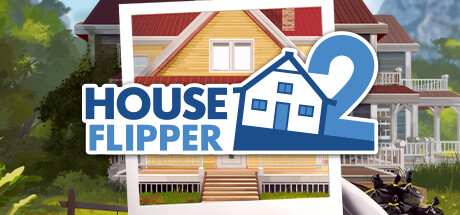







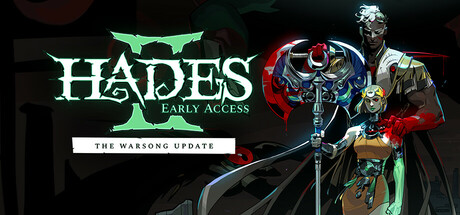



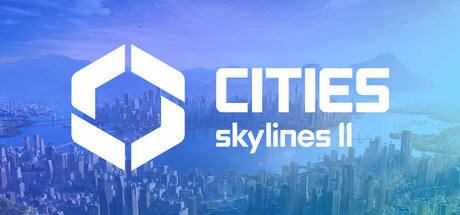




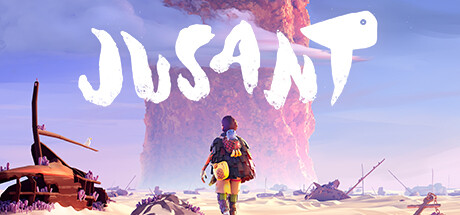




Pro tip
The full Steam Capsule Analyzer also shows how your capsule renders at every size players actually see. For the full store-page playbook, see our guide on how to optimise your Steam store page.
Step 5: Every asset you need
The full asset list, with exact specifications. Assets marked Required must be present before Valve will approve your store page.
Store and marketing capsules
| Asset | Required? | Dimensions | Format | Key rule |
|---|---|---|---|---|
| Main Capsule | Required | 1232×706 px | JPG or PNG | Logo legible; no promo text |
| Header Capsule | Required | 920×430 px | JPG or PNG | Logo legible; no promo text |
| Small Capsule | Required | 462×174 px | JPG or PNG | Logo fills most of capsule |
| Vertical Capsule | Required | 748×896 px | JPG or PNG | Portrait orientation |
Screenshots and video
| Asset | Required? | Dimensions | Format | Key rule |
|---|---|---|---|---|
| Screenshots (min. 5) | Required | 1920×1080 min, 16:9 | JPG or PNG | Gameplay only. No concept art, awards, or marketing copy. At least 4 flagged “suitable for all ages.” |
| Trailer | Required | Any resolution | MP4, H.264 | Upload directly to Steam (not YouTube). Gameplay in first 10 seconds. |
Library assets
| Asset | Required? | Dimensions | Format | Key rule |
|---|---|---|---|---|
| Library Hero | Recommended | 3840×1240 px | JPG or PNG | Artwork only. No text at all. |
| Library Capsule | Recommended | 600×900 px | JPG or PNG | Must include logo. |
| Library Header Capsule | Recommended | 920×430 px | JPG or PNG | Same as store header. |
| Library Logo | Recommended | 1280px wide and/or 720px tall | PNG, transparent | Logo only on transparent bg. |
Icons
| Asset | Required? | Dimensions | Format | Key rule |
|---|---|---|---|---|
| Shortcut Icon | Required | 256×256 px | ICO or PNG | Appears on desktop shortcuts. Must read at 32×32. |
| App Icon | Required | 184×184 px | JPG | Square icon for Library grid. |
Pro tip
The Library Hero is the only asset where text is explicitly forbidden. Studios consistently put text on it. Don't.
Screenshots: what gets you rejected
Screenshots must show actual gameplay. The most common rejection causes:
- Cinematic stills from a pre-rendered intro sequence
- Award badges or review scores overlaid on screenshots
- Marketing copy ("Best RPG of 2025!")
- Menu screens with no gameplay visible
Order your screenshots to tell a story about the game's variety and depth. The first screenshot is the most important: Steam often uses it as the display image before the trailer autoplay triggers.
Trailer: what works
Lead with gameplay in the first 5-10 seconds. Many players browse Steam with audio off. Your trailer should convey the game's hook through on-screen gameplay and text overlays, not narration alone. 60-90 seconds is the right length for a launch trailer.
Step 6: Tags, descriptions, and categories
Tags
Tags are the backbone of Steam's recommendation algorithm. They drive "More Like This" carousels, discovery queues, genre page placement, and personalised recommendations. Getting them wrong costs you visibility that no amount of marketing can recover. Steam allows up to 20 tags. Your top 5 receive the most algorithmic weight.
The most common tagging mistakes:
- Using "Indie" or "Singleplayer" as primary tags. These are true of so many games that they provide almost no signal about who should see your game.
- Filling the 20-slot quota with inaccurate genre labels. Inaccurate tags send your game to the wrong players and hurt conversion.
- Not researching the tags of successful comparable games. Look at 5-10 games in your genre with 500+ reviews and use their top tags as a starting point.
Rule: lead with specificity
Lead with the most specific sub-genre you can accurately claim: "Roguelike Deckbuilder" over "Roguelike" over "Card Game." Specificity makes the algorithm's job easier and routes you to players who are already looking for exactly your type of game.
Short description
300 characters. Appears under the game title in search results and category pages. Many players never read past it. The goal is to answer three things in two to three sentences: what the game is, what the player does in it, and why it stands out. State the genre comparison and the core mechanic. Skip the adjectives.
Long description
Supports BBCode formatting. No links to external websites allowed. Should not describe features planned but not yet in the current build. Structure it for skimming: use headers, short paragraphs, and feature bullets. Put your most compelling selling points first. End with a clear call to action (wishlist the game, follow for updates).
Categories
These are the feature declarations: Single-player, Multi-player, Steam Achievements, Steam Cloud, Controller Support, and others. Every category you declare must be implemented and functional in your build at review time. Declaring a feature that isn't in the build will cause build review rejection.
Mature content survey
Required for all titles. If you mark Adult Only Sexual Content, both store page and build must be submitted simultaneously and the review takes longer than the standard 3-5 business days. Budget at least two weeks. New as of 2024: Steam's content survey includes a mandatory AI disclosure section. Distinguish between Pre-Generated AI content (assets that ship with the game) and Live-Generated AI content (AI generating content during gameplay). Internal-only AI development tools may not require disclosure. Check the current survey for the latest guidance.
Germany: a hard visibility cutoff
Since 15 November 2024, games without a valid age rating are not shown to new German customers. Existing German owners can still access games they already own. This is a hard visibility cutoff, not a preference setting. Germany is one of Steam's largest markets. Budget time and cost for rating acquisition.
Language support
Declare interface, audio, and subtitle language support separately. Steam shows your game more frequently to players who use supported languages. Over 60% of Steam users run Steam in a language other than English. At minimum, localise your store page short description and key features into Simplified Chinese, Russian, Brazilian Portuguese, German, Spanish, and French. A localised store page is one of the highest-ROI investments a studio can make: it regularly outperforms in-game localisation in terms of wishlist impact per dollar spent.
Step 7: Store page review
Submit your completed store page for review via Steamworks. Valve's review process takes 3-5 business days. Submit at least 7 business days before you need the page live, and budget for one revision cycle.
What Valve checks
- Capsule images include a readable product name or logo
- Screenshots show actual gameplay (no concept art, cinematic stills, or marketing copy)
- Description is detailed and coherent, with no external links
- Listed features match what will be available at launch
- Mature content survey completed accurately
Common reasons pages get rejected
- Screenshots contain awards, review scores, or marketing copy
- Capsule art has no readable logo, or includes text beyond the game title
- Description is vague or too short
- Features promised on the page are not yet implemented
- External website links in the description
The title lock
Once your game has been through pre-release review, the title cannot be changed. Settle your public title before submitting for store review, including any subtitle considerations. Studios that discover this constraint after submitting have to live with whatever they submitted.
Once approved: approval means the store page has passed Valve's review. It does not release the game. Your page goes live as "Coming Soon" and the 14-day minimum clock starts. You still need build approval, a two-week public Coming Soon period, and a final manual Release App step before the game is accessible to customers. Submit for review as early as possible.
Stage 3: Build, launch and beyond
Primary goal: get your build through review, execute a clean launch, and manage the platform long-term.
Step 8: Uploading your build
Valve's content delivery and upload system is called SteamPipe. It's available as a GUI tool or via command line. The walkthrough below uses SteamPipeGUI, a Windows-friendly helper suited to most first-time studios. Professional and automated workflows typically use SteamCMD with VDF scripts instead. Uploading a build does not release your game. It makes the build available inside Steamworks. Public release still requires completed checklists, Valve approval, a two-week Coming Soon period, and the final manual Release App step.
Build terminology
- Depot: a collection of files Steam delivers to users. A simple game typically needs one depot. Separate depots can be used for Windows, Mac, Linux, DLC, soundtracks, and language-specific content.
- Build: a snapshot of uploaded depot content. Each upload creates a new build; setting a build live on a branch makes it available to users on that branch.
- Branch: controls which build a user receives. The default branch is what customers get after release. Password-protected beta branches are for testing.
- Package: controls access to apps and depots. The default store package Valve creates is sufficient for most simple first games. Custom packages are needed for Deluxe editions, bundles, and Early Access transitions.
SteamPipe GUI walkthrough
- Download the Steamworks SDK and store it somewhere permanent
- In Steamworks: open your app's App Admin page, scroll to Edit Steamworks Settings
- Note your App ID and Depot ID (found in the Depots section)
- Open
tools/SteamPipeGUIfrom inside the SDK folder - Fill in: App ID, Build Description (e.g. "v0.9 beta"), Depot ID, Build Path (the folder containing your game's executable), Branch name (leave as "default" unless uploading to a test branch), and your Steam account credentials
- Click Generate VDFs, then Upload
- Approve the Steam Guard 2FA prompt on your phone
- Wait for the success confirmation
Configure launch options before testing
Before the game can launch through the Steam client, configure at least one launch option under Installation > General Installation in Steamworks. This points Steam to the executable for each supported operating system. Without this configured, the build will not launch from Steam even if the upload succeeded.
The step everyone misses
After uploading, your changes are staged but not yet live. You must return to Steamworks and click Publish to make the build visible on your chosen branch. Steamworks shows a prominent red bar when unpublished changes exist. Many first-time developers upload successfully and spend hours confused about why nothing changed. They skipped the Publish step.
Default branch: before and after release
Before release, setting a build live on the default branch makes it available to Steamworks partner accounts and users with package access, but not the public. After release, the default branch is production. Updating it pushes a new build to all customers immediately. Test risky updates on a password-protected beta branch before pushing to default.
Testing before review
Before submitting for review, test your build on a beta branch using your own Steam account. Confirm it installs correctly, launches, and that all declared features work through the Steam client. Do not submit a build that hasn't been tested this way.
Two gotchas
Beta branch: if a beta branch doesn't appear after opting in, or the build doesn't update, fully quit Steam (kill the Steam process via Task Manager or Force Quit), then relaunch. A standard "Exit" sometimes doesn't clear session state.
Test package depot: adding a depot to a build doesn't give test accounts access to it. Test accounts must own the relevant depot via their test package. Check their package configuration under App Admin → Associated Packages & DLC.
Step 9: Build review
Build review requires your store page to be approved first. Submit your build only after your store page review is complete. Valve's build review takes 3-5 business days. Submit at least 7 business days before your target release date, and budget one revision cycle.
What Valve checks
- Product launches on all declared operating systems
- All features listed on the store page are implemented and functional
- In-game purchases route through Steam Wallet (no external store links)
Common reasons builds get rejected
- Game does not launch on a declared OS. Mac builds are by far the most common cause of rejection. Declaring macOS support without testing it is how this happens.
- Missing redistributables (VC++, DirectX, etc.) the build requires but doesn't package
- In-game purchase links to an external payment system instead of Steam Wallet
- Features declared on the store page are missing or broken in the build
Once approved: subsequent build updates after launch do not require re-review. The review is a one-time gate on the initial release. After release, setting a new build live on the default branch updates what all customers receive. Test risky updates on a beta branch first.
Steam Keys
Steam keys are redeemable codes for your game, used for press, QA, and external distribution. For first-time studios: you cannot request keys until three weeks after your App ID is created. The default allocation for new requesters is 5,000 release keys. Plan your press outreach timeline with this constraint in mind. For large-scale pre-launch testing, Steam Playtest is the better approach over requesting large key batches: it avoids consuming your key allocation and provides better access control.
Steam Deck and SteamOS compatibility review
Separate from store-page and build review, Valve also runs a compatibility review for Steam Deck and other SteamOS devices. It checks your game against four categories: input, display, seamlessness, and system support. The result is one of four badges shown on your store page and in a customer's library: Verified, Playable, Unsupported, or Untested.
You do not need to request this review yourself for most titles; Valve runs an automated pass, and many games also get a manual check. When it completes, results appear on your Steamworks Application Dashboard. You get roughly a week to review them before they go live on the public store page and in players' libraries.
An Untested badge is not neutral. Some players browse or filter specifically by Deck compatibility, so a game that hasn't been through the review at launch is invisible to that slice of traffic on day one. If your game supports a controller and runs at a reasonable resolution on modest hardware, most of the "Verified" bar is already covered; the main additional work is usually readable on-screen text at Deck resolution and a functional on-screen keyboard for any text entry fields.
Step 10: Demo, playtest, and Steam Next Fest
Demo vs. Steam Playtest
| Demo | Steam Playtest | |
|---|---|---|
| App structure | Separate App ID linked to base game | Same App ID as base game |
| Review required | Yes (3-5 business days) | No additional review |
| Access control | Open to all by default | Developer controls access |
| Use case | Public demo, Next Fest | Closed beta, stress testing |
| Wishlists | Demo downloads do not convert | Playtest signups do not convert |
How to create a demo
- Create a demo sub-app in Steamworks (no extra $100 fee)
- Complete the demo's store page (shorter checklist than main game)
- Upload a separate build for the demo
- Submit for review (same 3-5 business day timeline)
- Demo appears as a download button on your game's store page
A demo should end at a point of desire. Give players enough to understand what the game is, but leave them wanting more. Include a "Wishlist the Full Game" prompt at the end screen. Get your Coming Soon page live before launching the demo, so demo-driven traffic routes to your main game's wishlist page rather than a demo-only page.
Steam Next Fest
Steam Next Fest (SNF) is the single highest-impact marketing event available to prelaunch studios. Three editions per year (February, June, October). Each game is eligible to participate once. The 2026 October edition runs October 19-26.
Eligibility requirements:
- Game must be unreleased
- Must have a publicly playable demo by the time the festival begins
- Must have at least one publicly visible trailer
- Planned release date must be after the festival concludes
Because you can only participate once, use the SNF that falls closest to your launch date. Studios that burn their slot too early, with an unfinished demo and few wishlists, lose their one shot at the biggest organic discovery window they'll ever have. Registration closes weeks before the event; check deadlines at the Next Fest documentation.
For a full breakdown of how to prepare for and execute Steam Next Fest, including the readiness scorecard and how the algorithm works during the festival, see our guide on how to win at Steam Next Fest.
Step 11: Pricing and wishlist strategy
Setting your price
Set your base USD price in Steamworks. Steam auto-generates regional prices across 37+ currencies using Valve's pricing templates. Review these manually. The defaults for some markets (Turkey, Argentina, Brazil) can be disproportionately high or low relative to local purchasing power. To estimate the right price, look at 5-10 comparable games in your genre and take the median. Your price signals quality. Underpricing is common and hurts long-term revenue.
Pro tip
Gamalytic shows median and average prices by genre alongside estimated revenue, letting you cross-check whether a price point is realistic for your category before committing.
Launch discount rules
- Launch discounts run for 7-14 days (configurable)
- Maximum launch discount: 40%
- After the launch discount ends, a 30-day cooldown applies before any standard discount
- Seasonal sales (Spring, Summer, Autumn, Winter) are exempt from the 30-day cooldown between standard discounts, but cannot be used within 30 days of your release date
- Standard discounts: 10-95%, 1 day to 2 weeks
Many advisors recommend against launch discounts for small studios. Your launch price is the first quality signal to new players. A 10-15% launch discount is common and defensible; 40% at launch signals something is wrong with the price.
The wishlist conversion picture
External analyses of stronger Steam launches have reported week-one wishlist conversion around 15-17%, but conversion varies heavily by genre, price, reviews, demand, and launch quality. Games priced above $10 or with weaker review scores frequently see 10% or lower. These figures come from third-party analysis of a subset of launches and should be treated as rough benchmarks, not reliable targets. For more detail, see our insight on Steam wishlist conversion rates.
Steam sends one email to everyone who wishlisted your game on launch day. That email is the last time Steam contacts them on your behalf unless you run a discount of 20% or more.
Wishlist accumulation benchmarks (observed by developers, not confirmed by Valve):
- 7,000-10,000 wishlists: widely cited as the point at which Popular Upcoming placement becomes realistic
- 30,000+ wishlists: commonly cited as a reasonable buffer for a mid-tier indie launch
- Sub-500 wishlists: a high-risk position for any launch
Goodhart's Law and wishlist quality
Goodhart's Law (the economist Charles Goodhart, 1975) states: "When a measure becomes a target, it ceases to be a good measure." Studios that focus on raw wishlist count sometimes inflate it through giveaways and free key offers. The result is a large number of wishlists that don't convert to sales.
Wishlist velocity is the rate at which your wishlist count is growing, measured over a rolling window. Steam's algorithm appears to weight velocity over total count for Popular Upcoming placement. A spike from an organic Next Fest performance is worth far more than the same number accumulated through giveaways. Focus on converting real players, not padding the number.
The attribution problem
Steam's UTM analytics let you track which channels drive traffic to your store page. But once a player lands on Steam and eventually wishlists the game (possibly after three separate visits across different devices), the attribution chain breaks. You can see top-of-funnel impressions from each channel, and you can see wishlists going up. You can't reliably tell which channel caused which wishlist. This is a structural limitation of Steam as a tracking surface.
Improving attribution
Steam wishlists and pre-registrations are a black box. Players are largely anonymous, so games have no idea what actions which players have taken on other channels. One way to solve this is using a Customer Data Platform (CDP) like Immutable Audience, an extra layer that collects all of a game's fragmented player data into one place. Players go from being an anonymous number to a person you understand: what they respond to, and how similar players will likely respond. That is data Steam never exposes to you on its own.
Step 12: Launch day
You must click Release App manually
You must manually click "Release App" in Steamworks when you want the game to go live. Steam does not release your game automatically on the date you set. This has caused delays for studios who assumed otherwise.
The first 48 hours
Steam's momentum-based algorithm means a game's total lifetime trajectory is strongly correlated to its sales rate in the first 48 hours. The primary driver of day-1 sales is the wishlist count and wishlist quality you've built over the preceding months, not what you do on launch day itself.
To get on New and Trending (the primary algorithmic surface for new releases), some developers estimate that roughly $8,000 in early launch revenue may be enough in favourable conditions. The threshold is not public, not confirmed by Valve, and appears to vary based on competing launches. Treat it as a rough orientation, not a target.
Getting to 10 reviews
Below 10 reviews, Steam shows "No user reviews." To many players, that reads as "nobody has played this." Getting to 10 reviews as quickly as possible is a discrete milestone worth targeting in your launch-week communications. Include a direct request in your Discord, launch email, and any creator outreach.
Setting and changing the date
Specific release dates trigger email notifications to wishlist holders ("This game releases on [date]!"). The launch-day email carries meaningfully more urgency than a generic "game is on sale" notification. Don't set a specific date until you're confident you can hit it. A missed date is a negative public event. If your Coming Soon page is live and you want to change a date within 14 days of the target, you cannot do this self-serve. Contact Valve support directly.
Step 13: Post-launch operations
Update Visibility Rounds
Each game receives 5 Update Visibility Rounds for its entire lifetime. When used, your game gets a temporary boost in the "Recently Updated" section for users who have it wishlisted or in their library. Each round runs for up to 30 days or 1 million homepage impressions, whichever comes first.
- You must have posted a community announcement within the last 30 days to trigger a round
- Rounds can only be used after your initial launch visibility concludes (typically 2+ weeks post-launch)
- You only have 5. Use them carefully.
Use them for major content updates, DLC launches, platform additions (e.g., adding macOS support), or a significant version release. A round used for a minor bug patch is a round wasted.
Discounting strategy
| Period | Strategy |
|---|---|
| Launch | Optional 7-14 day discount, max 40%. 10-15% is defensible; 40% is not. |
| 30 days after launch discount ends | First eligible standard discount |
| Steam seasonal sales (Spring/Summer/Autumn/Winter) | Exempt from standard 30-day cooldown. Cannot participate within 30 days of launch. |
| Year 2+ | 50-75% to drive long-tail conversions |
2026 remaining seasonal sales: Summer Sale June 25 - July 9; Autumn Sale October 1-8; Winter Sale December 17, 2026 - January 4, 2027. Wishlist holders who are price-sensitive wait for a 20%+ discount and receive email notifications when it triggers.
Community management
Use Steam's Events and Announcements tools to post updates, even for small patches. Each announcement reaches followers in their activity feed. Respond to reviews, positive and negative alike. Developers who respond to negative reviews are perceived as more trustworthy, which affects new-purchaser confidence. Never argue with a negative review: acknowledge, thank for feedback, explain what's being fixed.
Conversion at launch: building an owned audience
Steam's one launch-day email is a single shot at converting the wishlists you spent months building. For most studios, it converts between 10-17% of wishlists on launch day. Studios that build an owned audience before launch (an email list or multi-channel contact list outside Steam) can send their own launch communications, run pre-launch countdown sequences, and reach players across email, Discord, and Telegram in the days surrounding launch.
Ubisoft's Might & Magic: Fates used a pre-launch owned audience built through Immutable Audience to run a five-phase email sequence in the weeks leading up to their February 2026 launch. The result was a 2.8x higher Day 1 player conversion rate compared to players who came through the standard Steam storefront notification alone. The gap widened to 3.0x by Day 14. The full case study is here. A studio of any size can build this kind of owned audience: collect direct contact from players before they arrive on Steam, then use it on launch day rather than relying entirely on the one notification Steam sends.
Long-tail strategy
A significant share of a game's lifetime revenue arrives in the first few months. But games with strong reviews, active communities, and consistent sale participation continue to earn for years.
- Participate in every applicable seasonal sale
- Respond to reviews and patch known issues
- Consider a permanent price reduction at Year 2 (resets the "lowest price" signal and can trigger re-exposure)
- Bundle with complementary games from other developers
- Register for themed genre festivals at the themed-sales documentation. Valve runs dozens per year and most studios miss them.
Conclusion
Most of what determines a Steam launch outcome is decided before launch day. The studios that get it right are the ones who start their account setup early, post their Coming Soon page before they feel ready, take their capsule art seriously, and build their wishlist count methodically over months.
There's no compression available on the hard gates: the 30-day clock, the 14-day minimum, the review windows. The only lever on those gates is starting earlier. We hope this guide gives you the foundation to set up your game on Steam correctly, avoid the common blockers, and get to launch day without preventable surprises.
Free launch review
Check your launch readiness before you ship
We'll review your store page and wishlist funnel against 800+ games, including Ubisoft's Might & Magic: Fates, where a pre-launch owned audience drove 2.8x higher Day 1 conversion.
Get my free launch review★★★★★ Trusted by Ubisoft, Netmarble, and 800+ studios
This guide is for general informational and educational purposes only and does not constitute legal, tax, or financial advice. It is based on Steam's publicly available processes as of 17 June 2026 and is subject to change by Valve at any time. Consult your own professional advisors to determine what is appropriate for your specific circumstances.